You may be considering this question now: How often is my site being accessed by AI crawlers compared with traditional search engines?
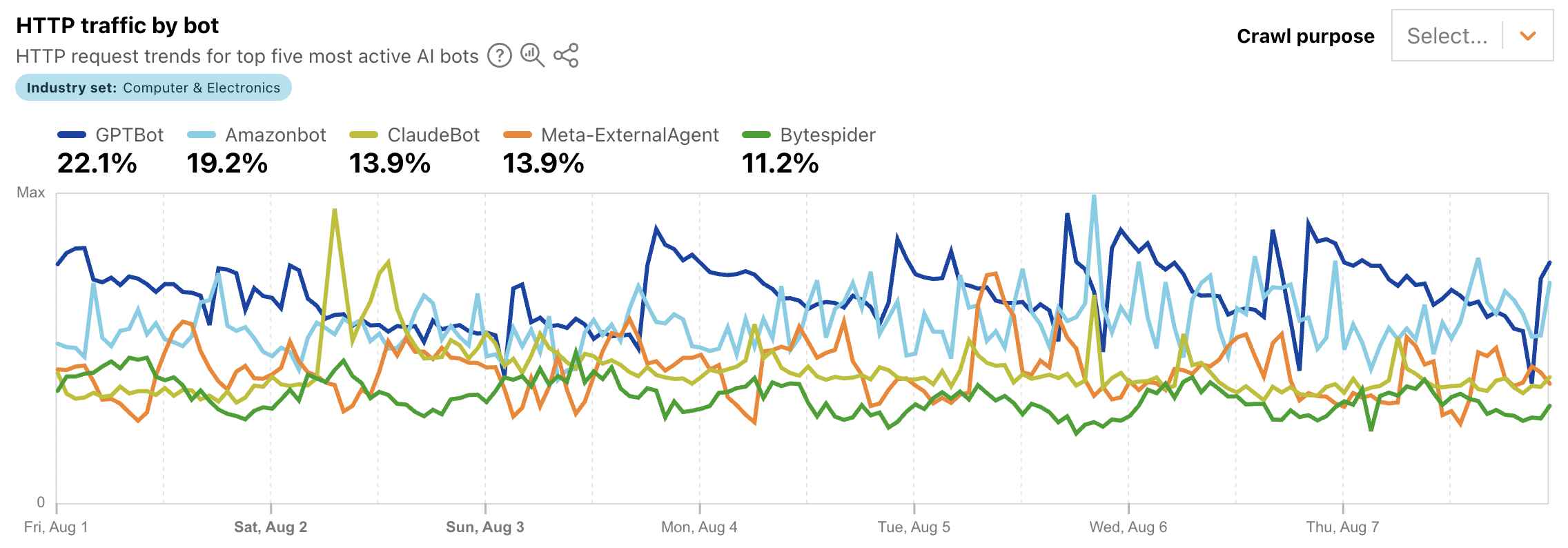
source: Cloudflare blog
The short answer is: Google Analytics can show you some AI-related traffic, but it usually cannot show you AI crawler traffic directly.
To understand the difference, you need to separate three things that often get mixed together:
- Human visitors from search engines
- Human visitors from AI tools
- Automated crawlers from search engines and AI companies
Google Analytics is useful for the first two. For the third, you usually need server logs, CDN logs, or hosting-layer analytics.
What Google Analytics Can Show
Google Analytics 4, or GA4, is good at showing how human visitors arrive at your site.
To check traditional search traffic, go to:
Reports → Acquisition → Traffic acquisition
Then set the dimension to:
Session default channel group
Look for:
Organic Search
This shows traffic from people who arrived through search engines such as Google, Bing, DuckDuckGo, Yahoo, and others.
To see specific search engines, change the dimension to:
Session source / medium
Then look for entries such as:
google / organic
bing / organic
duckduckgo / organic
yahoo / organic
This tells you how much visitor traffic came from traditional search engines.
GA4 can also show some traffic from AI tools, but only when a human visitor clicks from that AI tool to your website. In the same Traffic acquisition report, search for sources such as:
chatgpt.com / referral
perplexity.ai / referral
claude.ai / referral
gemini.google.com / referral
copilot.microsoft.com / referral
poe.com / referral
This kind of traffic answers a useful marketing question:
Are people finding us through AI answer engines and then clicking through to our site?
That is worth tracking. But it is not the same as crawler traffic.
What Google Analytics Usually Cannot Show
AI crawlers are automated systems that fetch your pages so that AI tools can index, summarize, cite, or otherwise use your content. Examples may include crawlers associated with OpenAI, Anthropic, Perplexity, Google, Meta, and others.
The problem is that many crawlers do not execute JavaScript. GA4 tracking usually depends on JavaScript running in the visitor’s browser. If a crawler requests your HTML page but does not run the GA4 tag, that visit may never appear in Google Analytics.
On top of that, analytics platforms often filter known bots and spiders. That makes GA4 a poor source for answering:
How often are AI crawlers accessing our content?
So, in GA4, you may see humans coming from ChatGPT or Perplexity. But you usually will not see GPTBot, ClaudeBot, PerplexityBot, Googlebot, Bingbot, or other crawlers in a clean, reliable way.
Why This Matters for Static Sites
This issue is especially important for static websites hosted on platforms like GitHub Pages.
For example, if your site is built with Quarto, pushed to GitHub, and served through GitHub Pages with a custom domain, you probably do not have normal server access logs. You are not running your own Apache or Nginx server. You are not getting AWS App Runner or CloudWatch logs. You are relying on GitHub Pages as the hosting layer.
That means you can use GA4 to measure human traffic, but you do not have a built-in way to inspect every raw HTTP request hitting the site.
How to Actually Measure AI Crawlers
To measure AI crawlers, you need visibility at the request layer. That usually means one of these:
Server access logs
CDN or proxy logs
Hosting analytics
Log analysis tools
For a GitHub Pages site, the most practical option is often to put a CDN or proxy in front of the site, such as Cloudflare.
The architecture changes from this:
Visitor or crawler
  → GitHub Pages
to this:
Visitor or crawler
  → Cloudflare
  → GitHub Pages
Once traffic flows through Cloudflare, you can inspect requests before they reach GitHub Pages. That gives you a much better chance of identifying user agents such as:
Googlebot
Bingbot
DuckDuckBot
GPTBot
ChatGPT-User
ClaudeBot
Claude-User
PerplexityBot
OAI-SearchBot
CCBot
Applebot
Bytespider
You can then compare traditional search crawlers with AI crawlers.
Recommended Reporting Setup
For most marketing teams, the right answer is not to replace GA4. It is to add another layer.
Use GA4 for human acquisition reporting:
google / organic
bing / organic
duckduckgo / organic
chatgpt.com / referral
perplexity.ai / referral
claude.ai / referral
gemini.google.com / referral
Use Google Search Console for search visibility:
queries
impressions
clicks
average position
indexed pages
Use Cloudflare or another CDN/proxy for crawler visibility:
Googlebot
Bingbot
GPTBot
ClaudeBot
PerplexityBot
OAI-SearchBot
If you need serious reporting, export logs to a tool such as BigQuery, Datadog, ELK, or even a local log analysis tool. Then you can build a monthly crawler report showing which bots accessed which pages, how often, and whether AI crawler activity is increasing over time.
Bottom Line
Google Analytics can help you answer:
Are humans coming to our site from search engines or AI tools?
It usually cannot answer:
How often are AI crawlers accessing our site?
For that, you need request-level data from server logs, CDN logs, or hosting analytics. If your site is hosted on GitHub Pages, the most realistic path is to keep GA4 for human traffic, keep Search Console for search performance, and add a proxy/CDN layer such as Cloudflare to monitor crawler activity.
For marketing teams trying to understand AI visibility, that distinction is critical. AI referrals show whether users are clicking from AI tools. AI crawler logs show whether AI systems are actually fetching your content. Both matter, but they answer different questions.