You have a draft of a better website page. How can you tell whether it is more likely to answer the questions people ask AI search tools before you publish it?
I show a sample campaign to compare existing pages with proposed replacements, question by question. Oppvera is free to use, and the example lets you follow the workflow.

Why compare content before it goes live?
A page can sound clearer to a person and still miss a specific question that someone asks an AI service. Conversely, a proposed page may better address a question without improving every question in the campaign. Looking at the results one query at a time helps you see which changes have a purpose and where the draft still needs work.
Oppvera’s Brand Defense workflow simulates how current and proposed content perform against a selected set of questions.
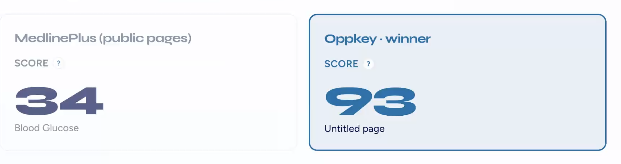
The simulation is a diagnostic aid. Your results depend on the questions you choose and the content you compare.
MedlinePlus Campaign Simulation Quick Start
Open Brand Defense, create a simulation for the existing company, and select the current and proposed versions of its pages. The quick start skips the downloading your own web site so you can get to the comparison.
The results summarize how often the proposed content performs better across the sample questions. In the walkthrough, the proposed version wins on 7 of 12 questions.
That number is a starting point: the useful part is opening each question to see the original page alongside the proposed content and understand why the result changed.
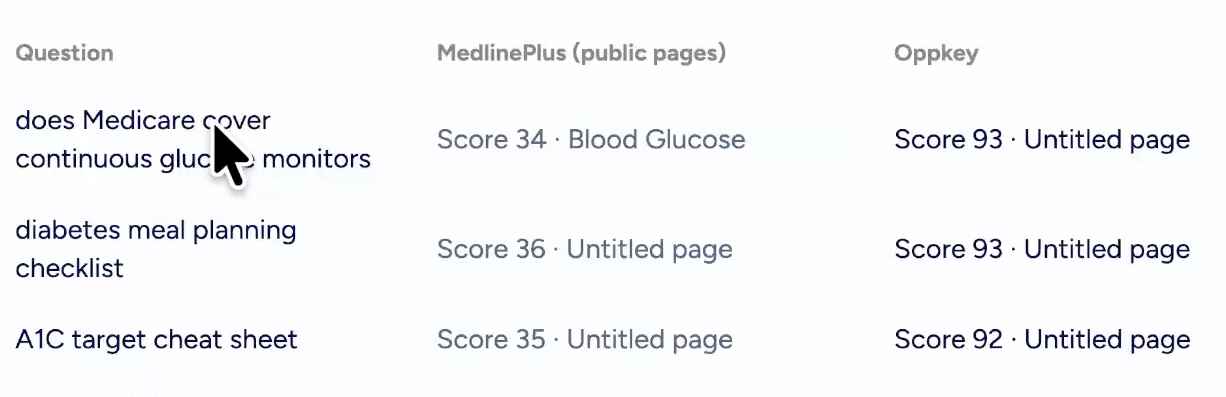
The video then shows two ways to share the findings. You can open a printable report and save it as a PDF, or generate a longer written simulation report. The written report can include an explanation of the proposed changes, a table of content changes, and the proposed content itself. You can add instructions about the intended audience and revise the report after reading it. Agencies can also configure the report branding for their firm.
How To Make a Content Proposal to a Client
Suppose a client asks you to improve a page, but the proposed rewrite has not been published. You could choose the questions the client wants the page to answer, compare the existing and proposed versions in Oppvera, then use the question-level results to refine your draft. The report gives you a way to discuss which questions the changes address, rather than asking the client to trust a broad claim that the rewrite is “better for AI.”
The same process can work for your own organization. Start with a small, relevant set of questions, include some that your current content handles poorly, and inspect the individual results before relying on the summary score.
Watch the six-minute Brand Defense walkthrough to see the complete sample workflow. Then try the free service at oppvera.com.